How to Run an ALT Text Coverage Audit on WordPress
An ALT text coverage audit shows exactly how many WordPress images are missing alt attributes, and which ones genuinely need fixing first.
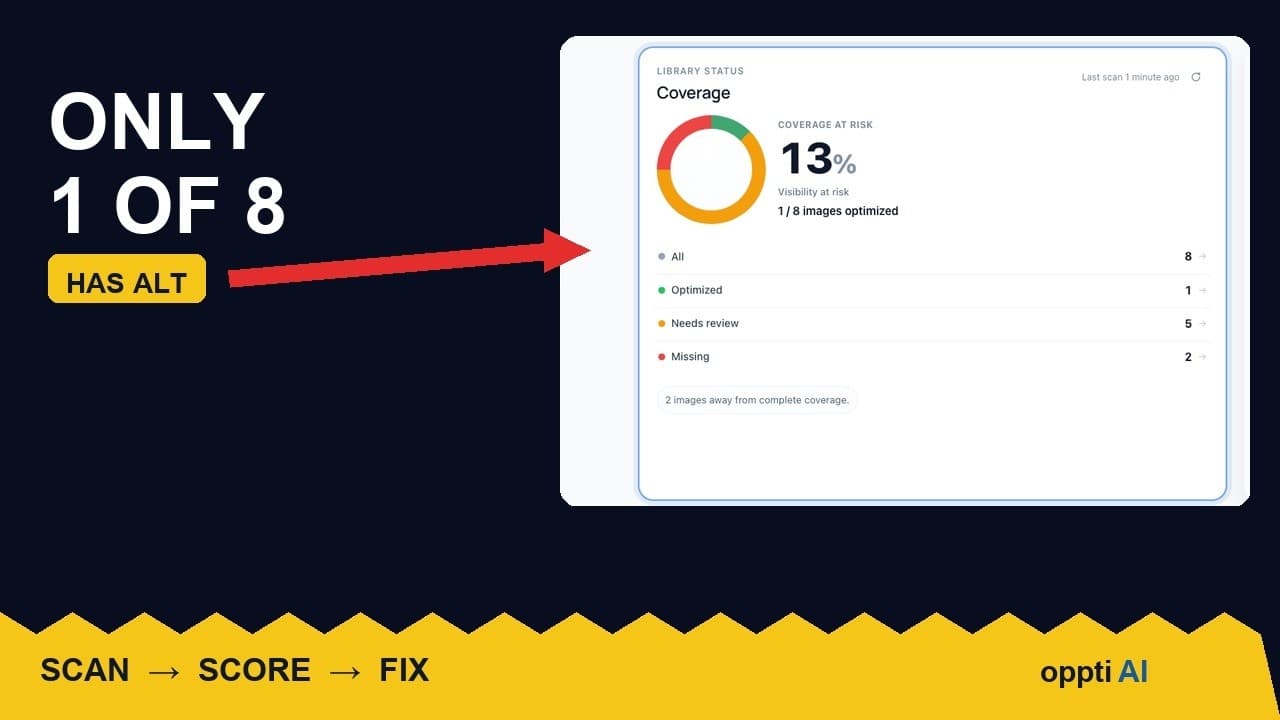
Most WordPress site owners have no real idea what their alt text coverage looks like until they run an audit and see the number. A recent scan of a working site turned up coverage of 13%: of eight images on the page, one had usable alt text, two were missing it outright, and five were flagged for review because what was there didn't actually describe the image. That gap is ordinary — it's just invisible until someone measures it.
What a coverage audit actually measures
An alt text coverage audit isn't a single pass/fail check. It scans every image on a page, or across a whole site, and sorts each one into a category based on what's actually in its alt attribute, not just whether the field happens to contain text. A field holding the filename, a placeholder, or a string copied from another image technically "has" alt text, but it isn't doing the job alt text exists for. A proper audit catches that distinction instead of counting any non-empty field as covered.
The output that matters is a percentage plus a breakdown, not a single score. Coverage alone tells you how much is handled; the breakdown tells you what kind of work is left.
The three categories: covered, missing, needs review
Covered. The image has alt text that genuinely describes what's in it, specific enough that someone who can't see the image would understand its purpose on the page.
Missing. The alt attribute is empty or absent entirely. This is the most obvious gap, and usually the smallest of the three once a site has been live for a while — most CMS workflows generate some alt text by default, even if it's poor.
Needs review. The field isn't empty, but it's not doing its job either: a filename like IMG_4213.jpg, a generic label like "image", or text copied from a different photo entirely. This bucket is routinely the largest, and it's the one most tools skip entirely because they only check for presence, not quality.
Why "needs review" is usually the bigger problem
Most alt text advice focuses on filling in blanks, because blanks are easy to count. But a site with low "missing" and high "needs review" has a worse real-world problem than the raw numbers suggest: every one of those fields is already marked as "done" by anything that only checks for presence, so it never resurfaces on anyone's to-do list. A screen reader user hits the same wall either way — an unhelpful description is barely better than none, and in some cases it's worse, because it sounds complete when it isn't.
Treating "needs review" as equivalent to "missing" during triage, rather than as a lower-priority afterthought, is what actually moves the coverage number in a way that holds up.
A practical walkthrough: auditing your own site
- Run a full scan rather than spot-checking a few pages. Coverage on your homepage and coverage across your whole media library are often wildly different numbers — spot-checking tends to pick the pages that were already tidied up.
- Look at the breakdown before the headline percentage. A 60% coverage score made up mostly of "needs review" fields needs a different plan than a 60% score that's genuinely 60% missing.
- Sort each bucket by where the image is used, not by upload date. A featured image or a product photo with a placeholder alt tag matters more than a decorative background image with the exact same technical status.
- Open a sample of "needs review" items and check them by eye. This is the step most automated tools skip, and it's usually where you find the biggest surprises — a batch of product photos that all inherited the same generic description during a bulk import, for example.
- Re-run the audit after a first pass of fixes, rather than assuming the work is done. New uploads and overlooked pages tend to surface the second time through.
What to do once you have your coverage number
The number itself is less useful than what it points you towards. A high "missing" count means a straightforward backlog to clear. A high "needs review" count means a quality pass, which takes more judgement and usually can't be fully automated — generated text still needs a human glance before it's trusted, especially on anything customer-facing like a product image.
Treat the audit as a starting map rather than a finished scorecard. The goal isn't to hit 100% and stop measuring; it's to know which images on the site are genuinely doing their job, and to recheck that periodically as new content gets added.
Frequently asked questions
What counts as a "good" alt text coverage score on WordPress?
There isn't a universal target, because coverage alone doesn't capture quality — a site showing 90% coverage that's mostly filenames and placeholders is in worse shape than a site at 70% where everything counted as covered genuinely describes the image. A more useful goal is tracking the ratio between "covered" and "needs review" over time, and pushing that ratio up rather than chasing a single headline number.
What's the difference between missing alt text and alt text that needs review?
Missing alt text means the attribute is empty or absent, which most scanning tools detect correctly. Alt text that needs review means the field holds something — a filename, a generic label, or boilerplate — that technically counts as "present" but doesn't actually describe the image to someone who can't see it. The second category is usually larger and gets missed by any check that only looks for presence rather than content.
Does alt text coverage affect SEO rankings directly?
Alt text itself isn't a confirmed direct ranking factor for standard web search, but it's one of the main signals Google Images uses to understand and surface a photo, and it's a genuine accessibility requirement independent of SEO. The indirect effect on search traffic — more image search visibility, better context for crawlers, fewer accessibility complaints — tends to matter more over time than any isolated ranking boost would.
See where your own site stands
A coverage audit turns a vague sense that "some images probably need fixing" into an actual, ordered list. Run a free image SEO audit to see your own coverage breakdown, or try OpptiAI Alt Text to fix what it finds without working through the Media Library one image at a time.
Related Posts
What a Low ALT Text Coverage Score Really Means
A low alt text coverage score on WordPress looks alarming at first glance. Here's how to read the number properly before you panic or ignore it.
Why WordPress Featured Image Alt Text Comes First
A featured image's alt text shows up in far more places than a normal content image. Here's why it deserves the first fix, not the last.
Fix WordPress Alt Text by Traffic, Not Upload Order
Working through missing alt text oldest-first feels productive but isn't. Prioritising by page traffic fixes the images that are actually seen.