Free on WordPress.org · Available now

AI Alt Text Generator

OpptiAI Alt Text finds missing WooCommerce and Media Library alt text, then writes AI descriptions you approve before anything saves. No OpenAI key. Scan your library and see coverage for free. Guest: 10 generations. Free account: 25 AI alt texts a month. Starter is £4.99 when the rest of the library is still missing.

Version 4.6.133 · No credit card required · Works on existing images · See a before & after example · YouTube channel

Used it on a real site? Leave a review on WordPress.org

Free
on WordPress.org
Bulk
AI alt text
Review
before every save

Built for WordPress image SEO and accessibility — no credit card to start.

Easiest installation

Install from WordPress.org

Open the official plugin listing, review the release details, and install through your WordPress dashboard.

Open WordPress.org

Manual installation

Download the latest ZIP

Upload the official stable ZIP from Plugins → Add Plugin → Upload Plugin in wp-admin.

Download ZIP
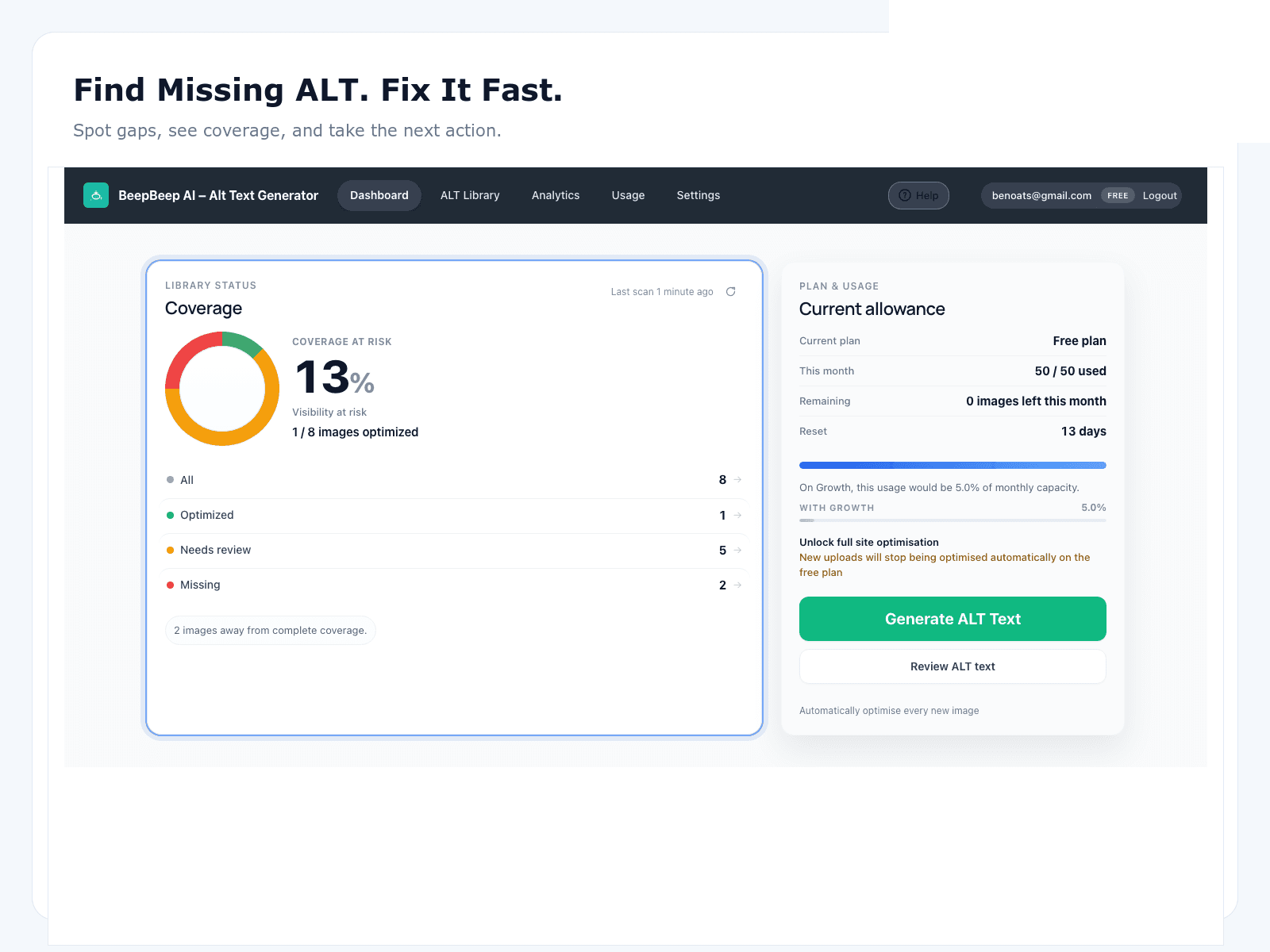
OpptiAI Alt Text dashboard showing coverage and usage

Real plugin UI — find missing ALT, track coverage, and generate from one dashboard.

See it in WordPress

Dashboard, bulk generation, review workspace, analytics, and WooCommerce — screenshots from the live plugin.

OpptiAI Alt Text dashboard showing missing ALT coverage and monthly usage

Dashboard overview

Spot gaps, see coverage, and take the next action.

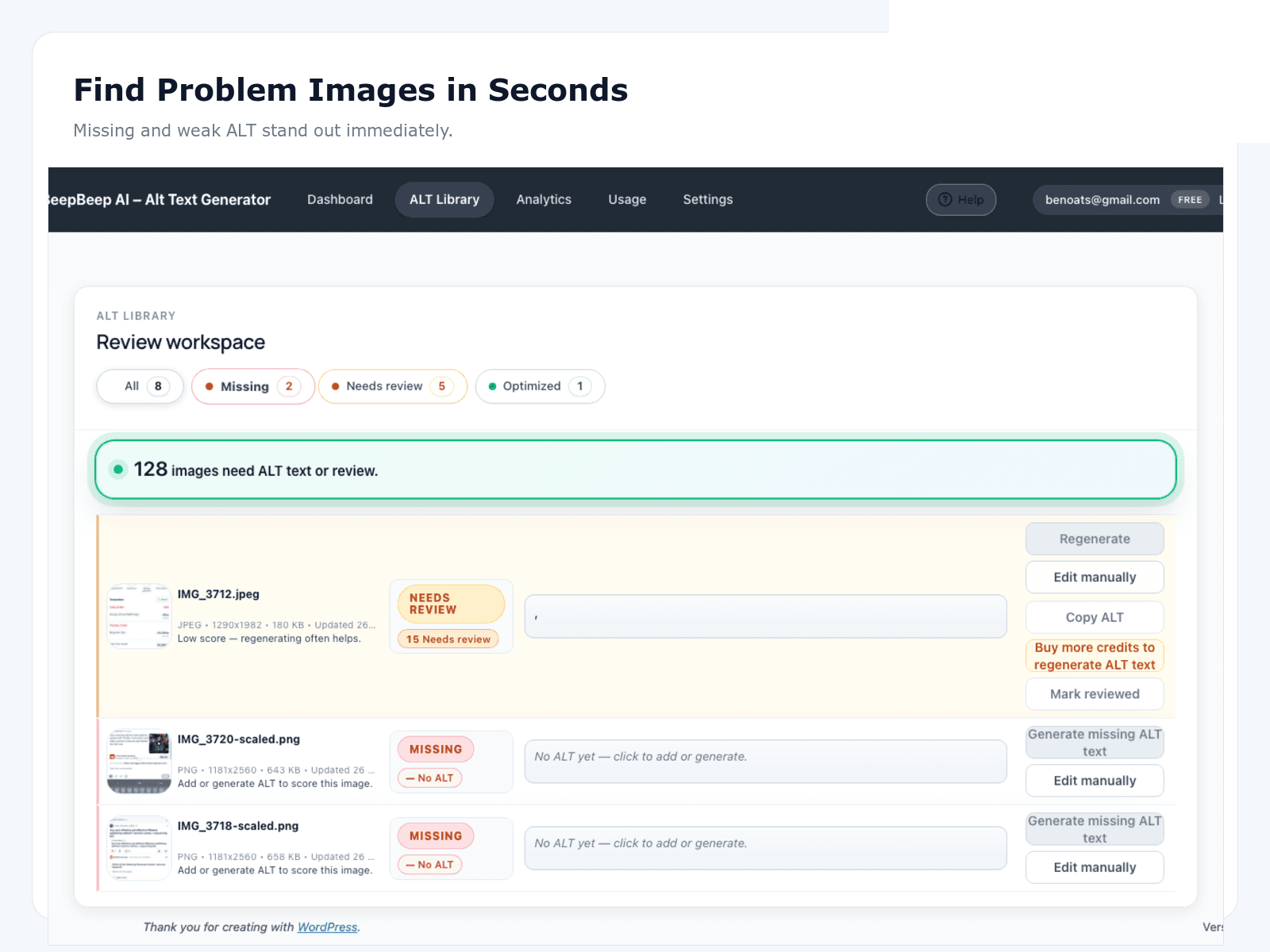
ALT Library review workspace listing images missing or needing review

ALT Library

Missing and weak ALT stand out immediately.

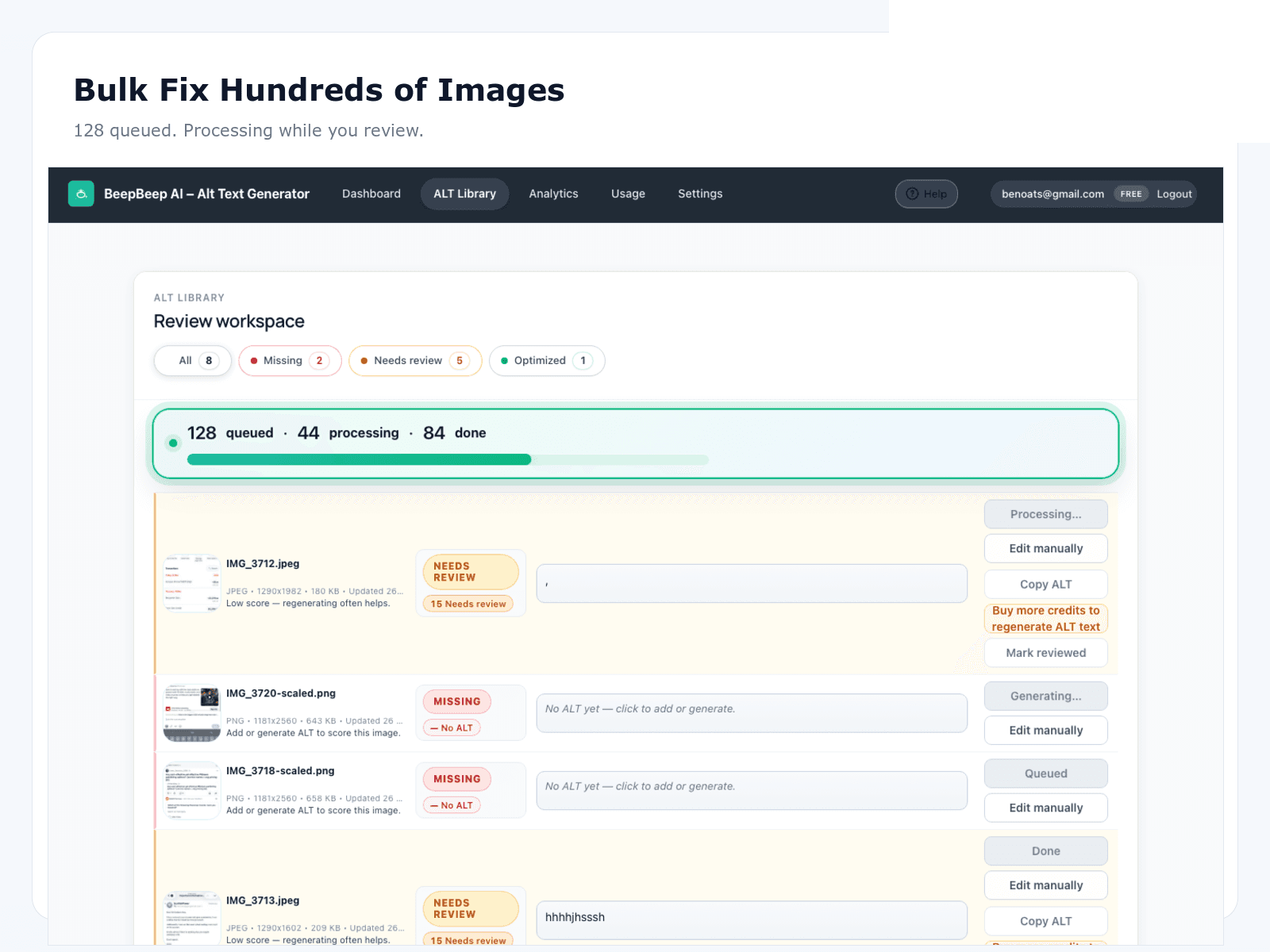
Bulk AI alt text generation queue processing WordPress images

Bulk generate

Queue images and process while you review.

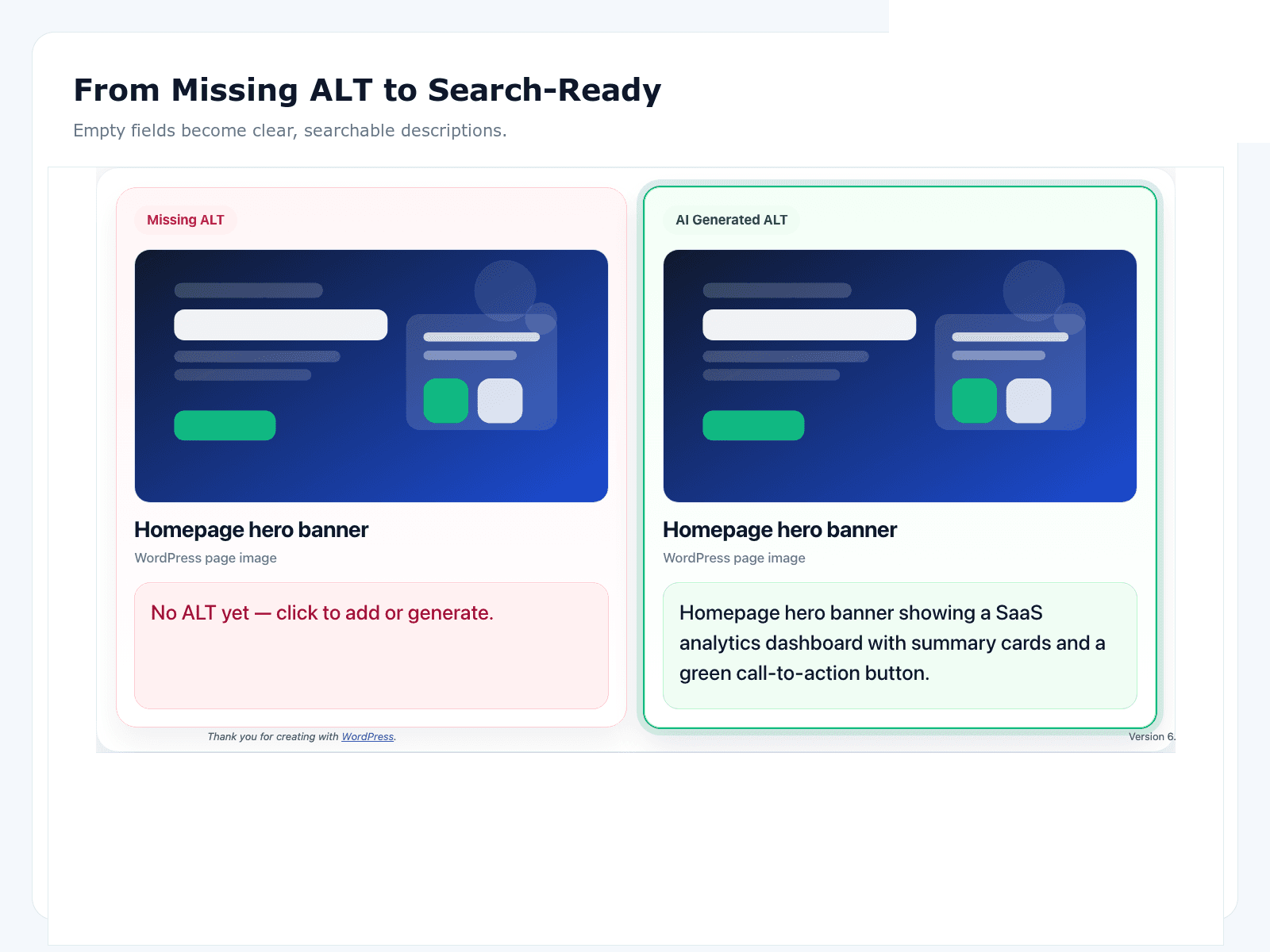
Before and after comparison of missing ALT versus AI-generated ALT text

Before & after

Empty fields become clear, searchable descriptions.

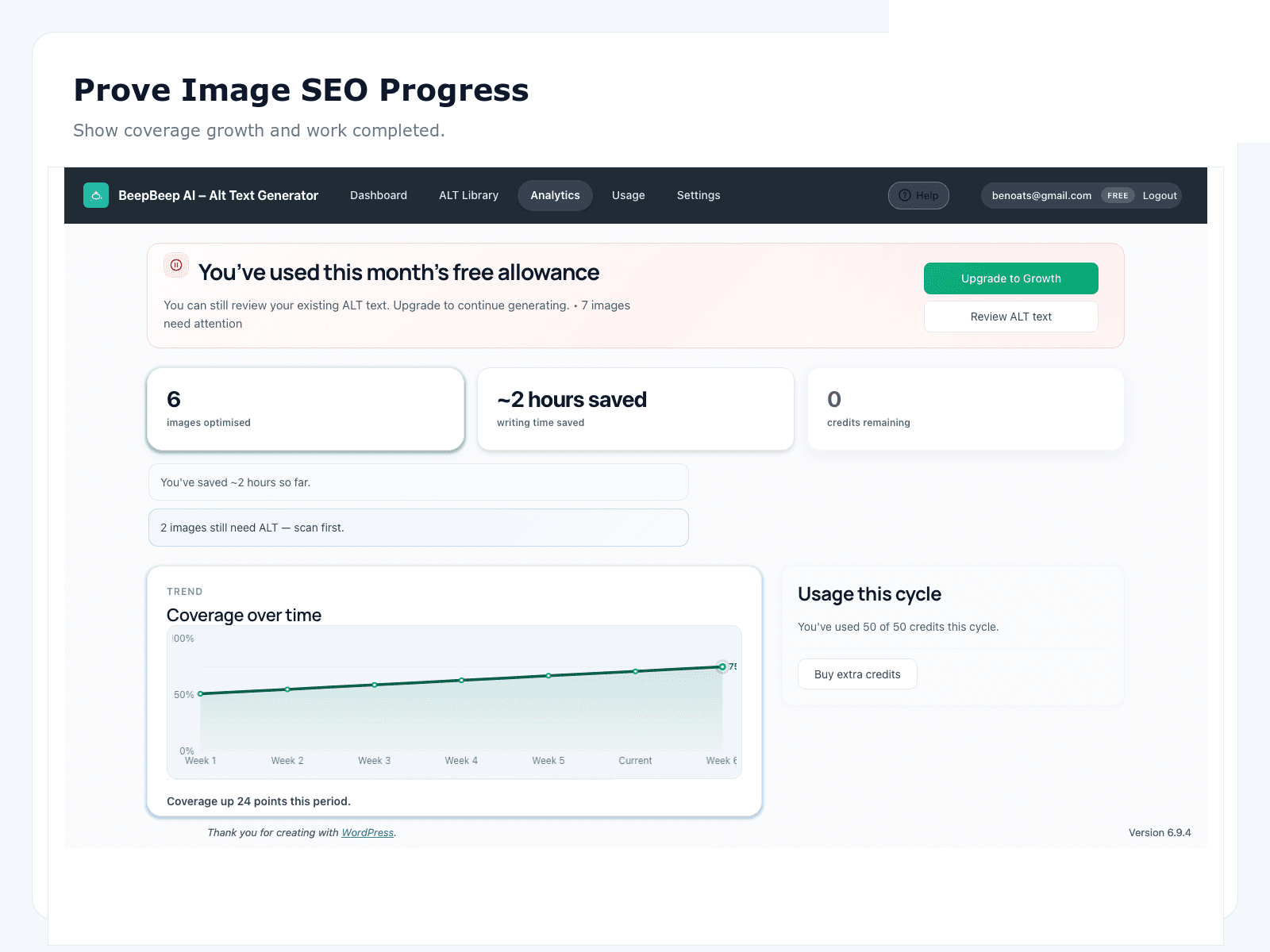
Analytics view showing image SEO coverage growth over time

Analytics

Prove coverage growth and time saved.

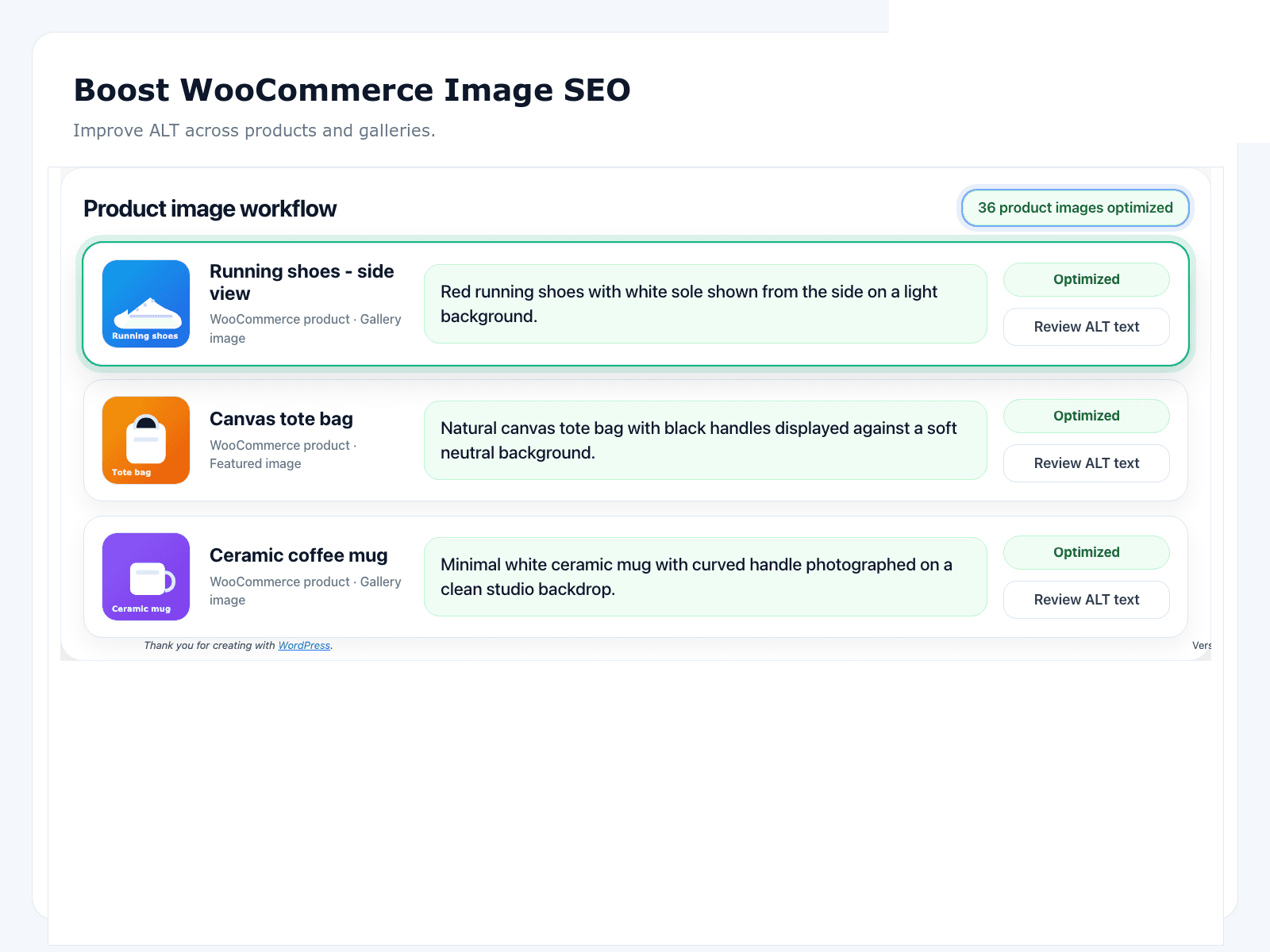
WooCommerce product image workflow with AI-generated ALT text

WooCommerce

Improve ALT across products and galleries.

Built for WordPress image SEO

Find missing ALT fast

Scan your media library and see coverage, missing images, and what needs review.

Bulk AI generation

Queue hundreds of images and generate descriptive, SEO-ready alt text in one pass.

Review before you save

Edit, score, and approve AI alt text so nothing weak goes live by accident.

Auto-optimise new uploads

Turn on automatic alt text for every new image so coverage does not slip again.

WooCommerce-ready

Optimise product featured images and gallery images without leaving wp-admin.

Multi-language support

Generate alt text in English, Spanish, French, German, Italian, Portuguese, and more.

Choose Your Plan

Free

Free

  • Guest: 10 generations, no account
  • 25 ALT texts/month
  • 1 site · review-before-save
  • Scan coverage for free
Install free

Starter

£4.99/month

  • 100 ALT texts/month
  • 1 site
  • Great for small business websites
  • Cancel anytime
Get Starter
Popular

Growth

£12.99/month

  • 1,000 ALT texts/month
  • Bulk processing
  • Autopilot for new uploads
  • 1 site · higher quota
  • Cancel anytime
Get Growth

Agency

£49.99/month

  • 10,000+ ALT texts/month
  • Multi-site bulk optimisation
  • Client usage reporting
  • Flexible billing control
  • Cancel anytime
Get Agency

Is OpptiAI Alt Text right for your site?

A practical decision guide for teams evaluating an AI alt text generator for WordPress — whether you run a blog, agency client site, publisher, or WooCommerce store.

Who OpptiAI Alt Text is for

OpptiAI fits WordPress sites where the Media Library has outgrown manual editing — typically a few hundred images upward, or any WooCommerce catalogue with product galleries. Bloggers with sporadic uploads may stay on the free tier indefinitely; agencies remediating client libraries, publishers with archival depth, and stores with CSV import churn benefit most from bulk generation plus review-before-save.

It is less suited to sites with a dozen bespoke images under legal sign-off, or libraries that are almost entirely decorative with a documented empty-alt policy. For broader context on coverage and audits, start with the WordPress image SEO hub.

Agencies managing multiple client sites benefit from predictable per-site pricing and a workflow clients can understand: scan coverage, approve a batch, report the before/after number. Publishers with deep archives can prioritise recent stories first, then work backward through evergreen content that still earns search traffic.

How review-before-save works

Review-before-save means AI drafts never overwrite live alt without your approval — scan the library, generate batches, edit in the ALT Library workspace, then save when satisfied.

That human gate matters because vision models misread materials, confuse similar products, or describe background details instead of the subject you sell. A two-minute QA checklist — accurate colour, correct product type, no competitor names, no keyword stuffing — keeps errors out of production faster than fixing them site-wide after autopilot runs.

New uploads can follow the same loop: automatic draft generation with optional auto-approve only when you trust the volume and content type. Most teams keep approval on for product and editorial photos.

The ALT Library workspace surfaces missing and weak alt in one list — you are not hunting through the Media Library grid attachment by attachment. Edit inline, score quality if needed, and approve batches when the queue looks right. That is the difference between AI that helps and AI that creates a second cleanup project.

WooCommerce product and gallery images

WooCommerce stores remediate featured images, gallery slots, and many variation images from the same Media Library workflow — no separate product-screen loop for every SKU.

Pilot on twenty bestsellers with multi-image galleries before touching the long tail. CSV imports without alt columns are the usual regression — pair remediation with import checklists and periodic rescans. Store-specific buying criteria live in the best WooCommerce alt text plugins guide and the for-woocommerce hub.

Variation images for colour and size need specific alt — not six copies of the parent product title. Decorative sale bursts should stay empty. OpptiAI filters informative product shots from theme chrome so bulk runs do not stuff alt into badges shoppers never hear described aloud.

How it compares to SEO suites

Yoast, Rank Math, AIOSEO, and SEOPress own titles, meta descriptions, schema, and on-page analysis — they are not built to queue thousands of Media Library attachments for AI drafts with approval.

Keep your SEO suite installed. Add OpptiAI for alt text at library scale. The jobs do not conflict. See Yoast SEO alt text for how the split works, and the alternatives library for head-to-head notes on other dedicated tools.

Image compressors remain separate — OpptiAI does not replace ShortPixel or your host optimiser for WebP conversion and file weight. Three tools, three jobs: suite for on-page SEO, OpptiAI for alt at scale, compressor for performance.

vs AltText.ai, BYOK plugins, and compressors

AltText.ai offers strong ecommerce workflows but leans more autopilot-oriented — verify the review step matches your QA bar. BYOK plugins are free to install but require your own OpenAI or provider API key and token budgeting. ShortPixel bundles alt generation with image compression; useful if you already pay for their optimiser, but confirm overwrite rules before bulk runs.

OpptiAI combines managed generation (no API key), review-before-save by default, and a free WordPress.org tier. Read the AltText.ai alternative breakdown and the best WordPress alt text plugins comparison for an honest feature matrix — no invented star ratings.

If you already pay for ShortPixel or similar, test their bundled alt against a dedicated trial on the same hundred images — overwrite behaviour and review UX matter more than consolidating vendors on paper.

Getting started: install → scan → bulk-fix

Install free from WordPress.org, open the dashboard, and scan coverage — you will see missing and weak alt as a number, not a guess. Queue a pilot batch of a few hundred recent uploads, review in the ALT Library, save, then expand to the full archive.

For the full operating model — batch sizing, QA checklists, and keeping new uploads covered — follow the bulk alt text for WordPress workflow. Run a free public-page audit first if you need stakeholder screenshots before opening wp-admin.

Upgrade when the free tier limit bites — usually after the first remediation sprint on a mid-size library. Paid plans add volume and automation so new uploads stay covered without reopening the backlog every quarter. Start on the free tier, prove the workflow on live content, then scale.

Frequently Asked Questions

Is OpptiAI Alt Text a free WordPress plugin?

Yes. Guest: 10 generations with no account. Free account: 25 AI alt texts a month, with scanning, generating, and review-before-save. Paid plans add higher monthly volume, bulk capacity, and Autopilot for new uploads.

How does the AI alt text generator work in WordPress?

Install the plugin, scan your Media Library for missing or weak alt, then queue images for AI generation. Drafts appear in a review workspace where you edit and approve before anything saves to the database — no silent autopilot overwriting live alt.

Do I need an OpenAI or other AI provider API key?

No. OpptiAI runs generation through managed infrastructure — you do not bring your own API key. That differs from BYOK plugins where you supply and pay for provider tokens separately.

Can I edit generated alt text before it goes live?

Yes. Review-before-save is the default workflow. Edit materials, colourways, and brand wording in the ALT Library, then approve batches when you are satisfied. You can also re-open and revise saved alt later.

Does it work with existing images and bulk processing?

Yes. Bulk-generate alt for thousands of existing Media Library attachments, or enable automatic drafts for new uploads so coverage does not slip after remediation. See the bulk alt text workflow guide for the scan → generate → approve → save operating model.

Does it support WooCommerce product and gallery images?

Yes. Featured images, gallery slots, and many variation images can be remediated from the same media-library workflow. Store operators should also read the WooCommerce image SEO hub for SKU prioritisation and import checklists.

What languages are supported?

English, Spanish, French, German, Italian, Portuguese, and additional languages. Pick the output language per site or batch so multilingual catalogues and publishers can generate consistent alt without hand-translating every attachment.

Start fixing missing ALT today

Install free from WordPress.org. Upgrade anytime when you need more capacity.