Disclosure: OpptiAI builds OpptiAI Alt Text Generator for WordPress. The workflow below stands whether or not you use our plugin — governance and human review are not optional extras. This is operational image SEO guidance, not legal advice or a WCAG conformance claim.
What breaks at publisher scale
Publisher image SEO fails quietly. The CMS accepts uploads; stories ship on deadline; and the Media Library becomes a graveyard of filenames, caption paste, and blank alt fields. Six months later, procurement asks about accessibility and nobody can point to a coverage number.
The usual failure modes are predictable: thousands of assets reused across stories with stale metadata; freelancers uploading without house style; migrations that preserve files but drop alt; and “we will fix SEO later” queues that never get budget because there is no owner after publish.
Newsrooms feel this differently from ecommerce catalogues. You are not optimising a fixed set of SKUs — you are shipping new URLs daily, reusing wire photography across angles, and fighting template drift between verticals. A plugin alone cannot fix that; you need roles, a written standard, and a sample cadence that surfaces drift before an external audit does.
- Caption text pasted into alt — wrong job, wrong context for screen readers
- Wire photos keyword-stuffed on decorative chron crops
- Same asset, three URLs, one generic alt string copied forever
- No weekly sample — drift invisible until an external audit
- Theme redesigns that preserve attachments but break featured-image templates
Operating model (roles)
Image SEO in a newsroom is a three-way handoff. When everyone owns everything, nobody owns anything — and the library rots between redesigns.
The model that survives busy desks separates meaning from measurement. Editorial decides what the image conveys in this story. SEO defines what “useful alt” means and samples whether the desk actually follows it. Engineering keeps bulk tooling safe — permissions, logs, rollback — so a well-meaning intern cannot silently overwrite ten thousand attachments on a Friday afternoon.
- Editorial: write or approve alt that matches the story, not a generic stock description. Producers gate publish; reporters own meaning on their photography.
- SEO / content ops: define standards, sample-check AI drafts, run audits on high-traffic templates, and report coverage samples — not vanity totals.
- Engineering: wire bulk tools with permissions, logs, and rollback — not silent overwrites on production.
AI assist sits in the middle: drafts accelerate the desk; humans approve before save. See the publisher case study for how one newsroom raised new-publish coverage from ~40% to ~88% in six weeks by putting governance ahead of archive heroics.
Standards worth writing down
Oral standards do not survive shift changes, freelancer turnover, or election-night live blogs. One page on the wiki beats a quarterly training deck nobody opens.
Start with three decisions every desk can apply in under a minute: Is this image informative or decorative? If informative, what would a reader miss without seeing it? If decorative, is empty alt explicitly allowed for this template? Everything else — length limits, banned phrases, stock-agency rules — hangs off those answers.
- Max length and banned phrases (no “image of”, no stuffed brand lists)
- When empty alt is allowed — purely decorative crops and spacers
- Filename rules for staff photography vs licensed stock
- Who can run bulk AI jobs — and what gets logged
- Breaking news: short alt is fine; accuracy beats length
Desk one-liner
“Describe what the photo shows for this story. If the crop is decorative, leave alt empty. Never paste the caption or filename.”
Pair this with the WCAG 2.2 image requirements guide for decorative policy language and the WCAG image checklist for day-one contributors.
On-upload workflow that survives a busy desk
New publishes are the leading indicator. Fix the upload path first and archive cleanup becomes a planned project — not an endless guilt list.
- On upload: AI draft + required review for featured and in-article informative images before go-live.
- Desk edit: who, what, where — names, locations, and action verbs. Reject keyword stuffing even when an SEO stakeholder asks for it.
- Publish checklist: alt reviewed is a gate, not a post-publish ticket.
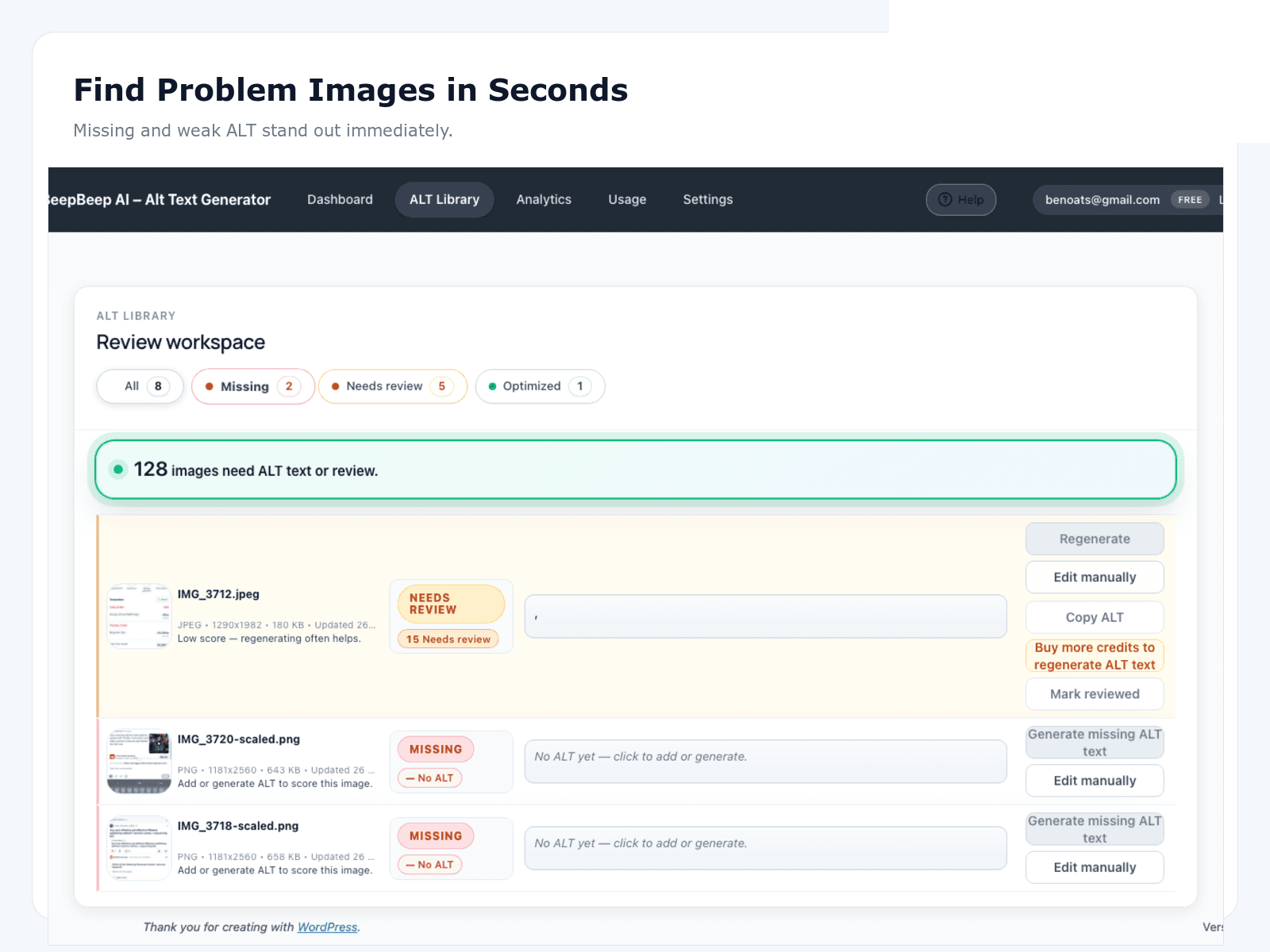
Target 20–40 seconds of desk time per featured image with AI draft plus edit. If review takes longer, your standard is probably too long — or your drafts lack headline context.
Breaking news is not an excuse to skip alt — it is a reason to keep it short and accurate. “Protesters outside city hall” beats a three-sentence essay when the photo desk is racing the wire. Save longer descriptions for explainers and features where the image carries analytical weight.
Reuse rules when assets travel across stories
Publishers reuse wire photos, staff shots, and stock assets constantly. The file already in the library does not mean the alt from story one still fits story three.
WordPress stores one alt string per attachment ID. That is efficient for library hygiene and dangerous for editorial reuse: updating alt for a new story overwrites the metadata for every past URL still referencing that file. Train producers to think at attach-time — does this alt match today’s headline and lede? — not only at first upload three years ago.
- Re-check alt when attaching an existing asset to a new URL — context changes
- Do not copy the first upload’s alt forever across unrelated angles
- Evergreen explainers: alt should match the explainer, not the breaking headline
- Licensed stock: follow agency rules; do not invent scenes the licence forbids
- Photo galleries: each frame may need distinct alt when frames carry different facts
When the same wire image legitimately needs different descriptions on two live URLs, consider whether the attachment should be duplicated with a crop-specific filename — or whether one story should use a different asset. There is no magic plugin setting that gives one file two alts on two pages without template-level overrides.
Audit cadence that catches drift early
Without a cadence, coverage looks fine until an external audit or procurement questionnaire proves otherwise. Sample honestly — decorative keyword stuffing counts as failure, not green metrics.
Pick one operational definition of “useful alt” and apply it every week to the same sample size — for example, 50 new publishes across your top four sections. Filename alt, caption paste, and empty informative featured images all count as misses. Reporting a sitewide attachment total without sampling new publishes will lie to you kindly.
- Weekly: sample new posts for empty alt and keyword stuffing across top sections
- Monthly: audit section hubs and a random slice of high-traffic URLs
- Quarterly: bulk pass on oldest gaps in money sections — see bulk archive below
- After migrations: full re-baseline before trusting historical coverage numbers
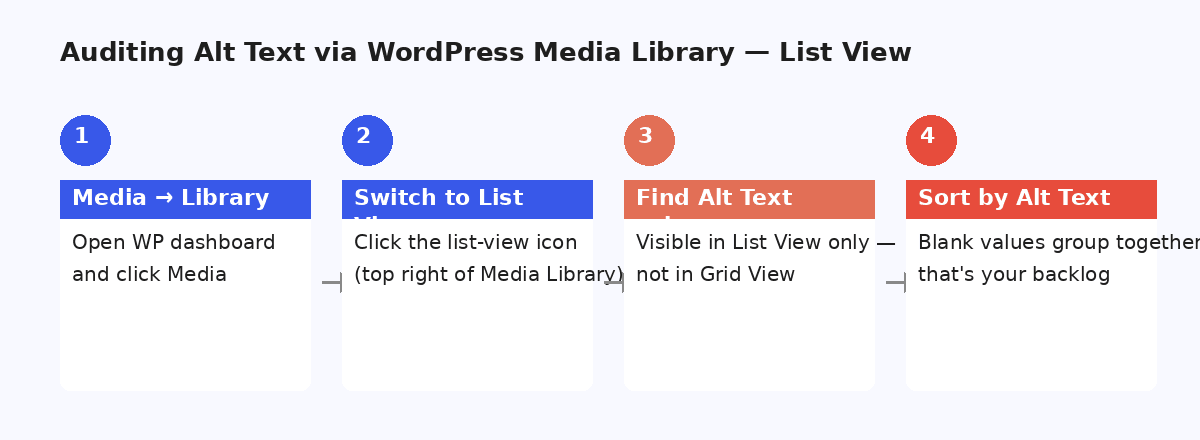
Bulk archive pass (money sections first)
Archive cleanup belongs after governance — not before. Boiling the ocean while new publishes still ship without alt just reopens the gap you thought you closed.
Phase 1 archive scope should be defensible in a steering meeting: homepage heroes, section hub featured images, and evergreen explainers that still earn traffic. Same-day chron posts from 2019 are usually Phase 2 or never — trying to perfect them while the desk still skips alt on new publishes is backwards prioritisation.
- Homepage heroes and section hub featured images
- Evergreen explainers that still earn organic and Image search traffic
- High-impression templates — not the full chron firehose in Phase 1
- Batches of a few hundred with the same review gate as new uploads
For tooling patterns, see bulk alt text for WordPress. Engineering should log who ran bulk jobs and enable rollback — silent overwrites erode desk trust fast. Our composite publisher case study remediated roughly 2,100 money-section images in Phase 1 while keeping the chron firehose out of scope.
Where OpptiAI fits (honestly)
OpptiAI plugins help generate and refresh alt at volume inside WordPress. They do not replace editorial judgment, a written house style, or the decorative policy your desk actually follows on deadline.
Use the free audit to spot gaps on public section URLs before anyone argues the library is “mostly fine.” Use bulk generation when you have a review path — not as a fire-and-forget rewrite of the entire CDN. The scan → generate → review → save loop matches how newsrooms already work: fast drafts, human gate, then publish.
Paid plans exist when upload volume outgrows the free tier; see pricing. If you are an agency supporting publisher clients, pair this playbook with the agency remediation guide for SOW language and coverage reporting.
FAQ
Common publisher questions on alt text, ownership, and how often to re-audit. For a worked example with sample coverage numbers, read the publisher media library case study.
Should every stock photo get unique alt text?
Yes when the image carries meaning for the reader or appears in search. Decorative chrome can use empty alt. For publishers, the bigger risk is reuse: the same image in three stories needs context that matches each page — not one generic phrase copied forever.
Who should own media SEO — SEO, editorial, or engineering?
Editorial owns meaning; SEO owns standards and audits; engineering owns tooling and permissions. AI assist sits in the middle: writers review; SEO checks samples; engineering keeps bulk jobs safe.
How often should we re-audit the library?
After major migrations or theme changes, then on a monthly sample of new uploads plus a quarterly sweep of high-traffic URLs. Continuous upload volume without a cadence is how libraries quietly rot.
Do we need to fix the entire archive before shipping new standards?
No. Stop new debt first — governance on new publishes — then bulk-clean money sections (homepage, hubs, evergreen explainers). The chron firehose can stay out of Phase 1.
Is caption text enough instead of alt?
Sometimes captions carry the story, but alt and captions are different jobs. Screen readers may not read captions with the image. Write alt for what the image alone conveys; use captions for context and attribution.