Why native WordPress cannot bulk alt text
WordPress stores alt text per attachment in the Media Library. You can click into any image, type a description, and save — one at a time. That works for a dozen photos on a brochure site. It does not work when a publisher, agency, or membership site has five years of uploads, migrated content from another CMS, or a folder of stock images dropped in by a contractor.
Native WordPress also lacks a coverage report. You cannot ask “how many informative images on my site have empty alt?” without exporting data or installing a tool. There is no batch queue, no weak-alt filter, and no approval workflow. Bulk alt text for WordPress therefore means a plugin or external process — not a hidden core feature waiting in Settings.
The same gap applies whether you run a blog, a portfolio, a nonprofit, or a WooCommerce store. Stores have extra complexity around product galleries, but the underlying problem is library scale, not commerce alone.
Page builders and block themes make the gap worse, not better. Images embedded in reusable patterns, synced patterns, and template parts still resolve to Media Library attachments. Fixing alt in the post editor alone misses half the library if your team uploads to folders and inserts later. A library-first workflow catches attachments regardless of where they render on the front end.
Audit a few public pages before you install anything
Start outside wp-admin. Pick three to five live URLs that represent your real content: a flagship post, a service page, a team page, and anything with image-heavy layouts. Run them through the free image SEO audit to see missing alt on the public HTML — what crawlers and screen readers actually receive.
The audit gives you a stakeholder-friendly screenshot: “here is the gap on pages we care about.” That matters when you are asking for budget or plugin approval. It also prevents over-scoping. Decorative theme images, empty spacers, and purely ornamental graphics may correctly have empty alt. Your remediation target is informative photos — people, products, diagrams, charts, and screenshots that convey meaning.
Write a one-line decorative policy before you generate anything: which image types stay empty on purpose, and which must always get a description. That policy saves arguments during batch review.
Export a simple spreadsheet if you need procurement approval: URL, image count on page, count with missing alt, and one example screenshot. Numbers beat adjectives when you are asking a director to approve a plugin subscription or contractor hours.
Install OpptiAI Alt Text and set review-first defaults
Install OpptiAI Alt Text Generator from WordPress.org (listed as OpptiAI Alt Text) or upload the ZIP from your dashboard if your host blocks the directory. The plugin attaches to the Media Library on any standard WordPress install — no WooCommerce requirement.
Before your first bulk run, confirm review-before-save is enabled. Auto-publishing AI drafts without a human gate is how sites end up with keyword-stuffed nonsense or wrong product colours. OpptiAI is built around approve-then-save; keep that setting on unless you have a documented exception for a tiny, low-risk library.
If you use an SEO suite (Yoast, Rank Math, AIOSEO, SEOPress), keep it for titles and schema. Alt text at library scale is a separate job. Stacking a focused alt plugin alongside your suite is normal — not redundant.
On multisite or agency stacks, install on a staging clone first. Run a fifty-image pilot batch, agree on voice with the client, then promote the workflow to production. Skipping staging is how you learn the model describes “corporate handshake” on a medical device photo — on live pages.
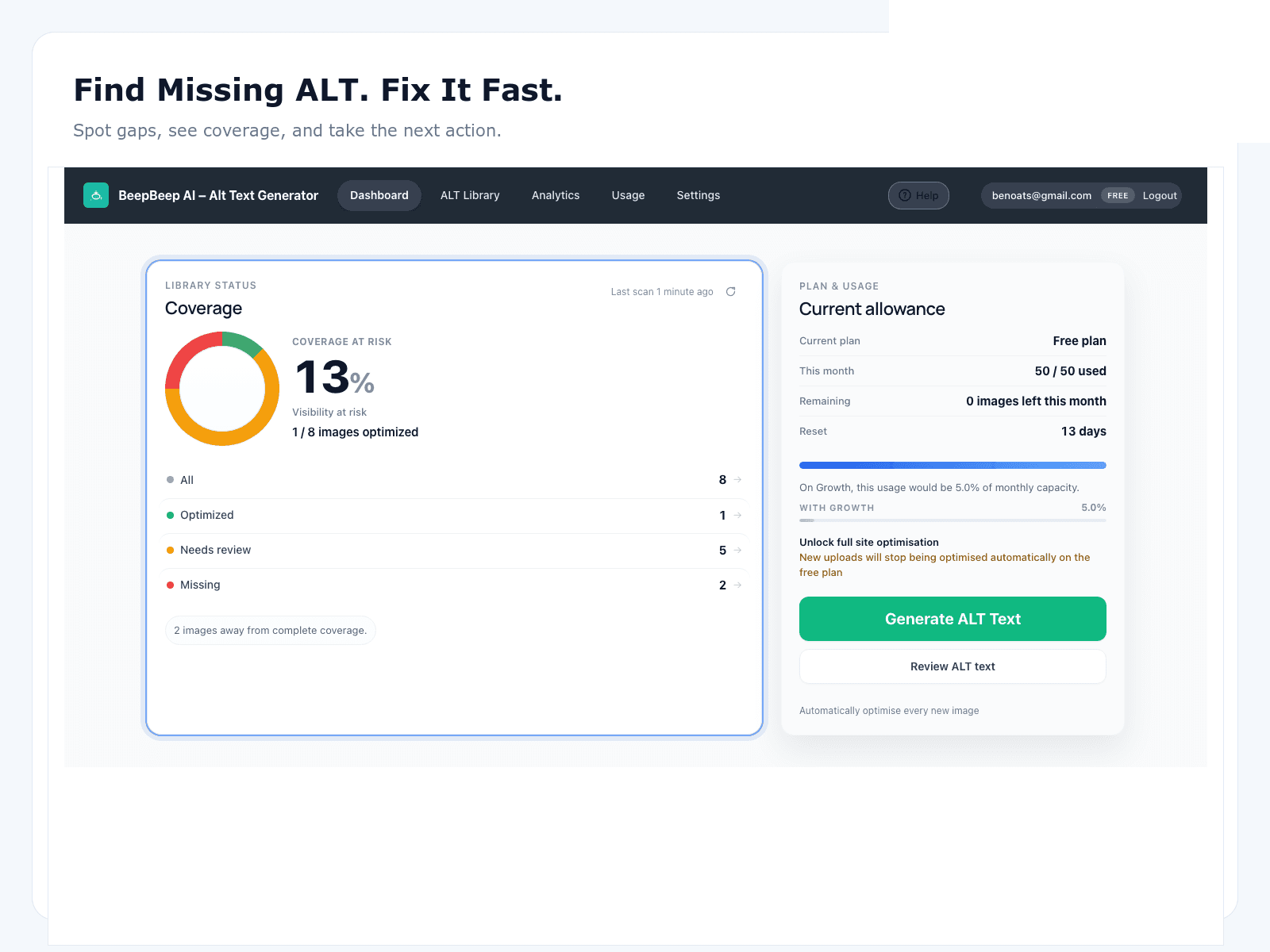
Scan the media library for missing and weak alt
Open the plugin dashboard and run a library scan. You are looking for three buckets: completely empty alt, filename-only alt (hero-banner-v3.jpg copied into the field), and generic placeholders (“image”, “photo”, “wordpress”). Each bucket needs different editorial attention, but all belong in the queue.
Large libraries benefit from phased scoping. Month one: everything uploaded in the last twelve months plus anything attached to top-traffic posts. Month two: the long tail. Agencies often scope per client site the same way — active content first, archive second.
If your site mixes blog content and ecommerce, the scan still runs on attachments. Store owners may want to prioritise product-linked media first; that prioritisation logic lives in the WooCommerce image SEO guide, not here. This page stays focused on the universal WordPress workflow.
Generate AI drafts in batches — then approve before save
Bulk generate alt text in batches you can actually read. Two hundred images per session is a reasonable ceiling for most teams; smaller batches if your content is technical or brand-sensitive. The AI proposes descriptions based on what it sees in the image file. Your job is to edit, reject, or approve.
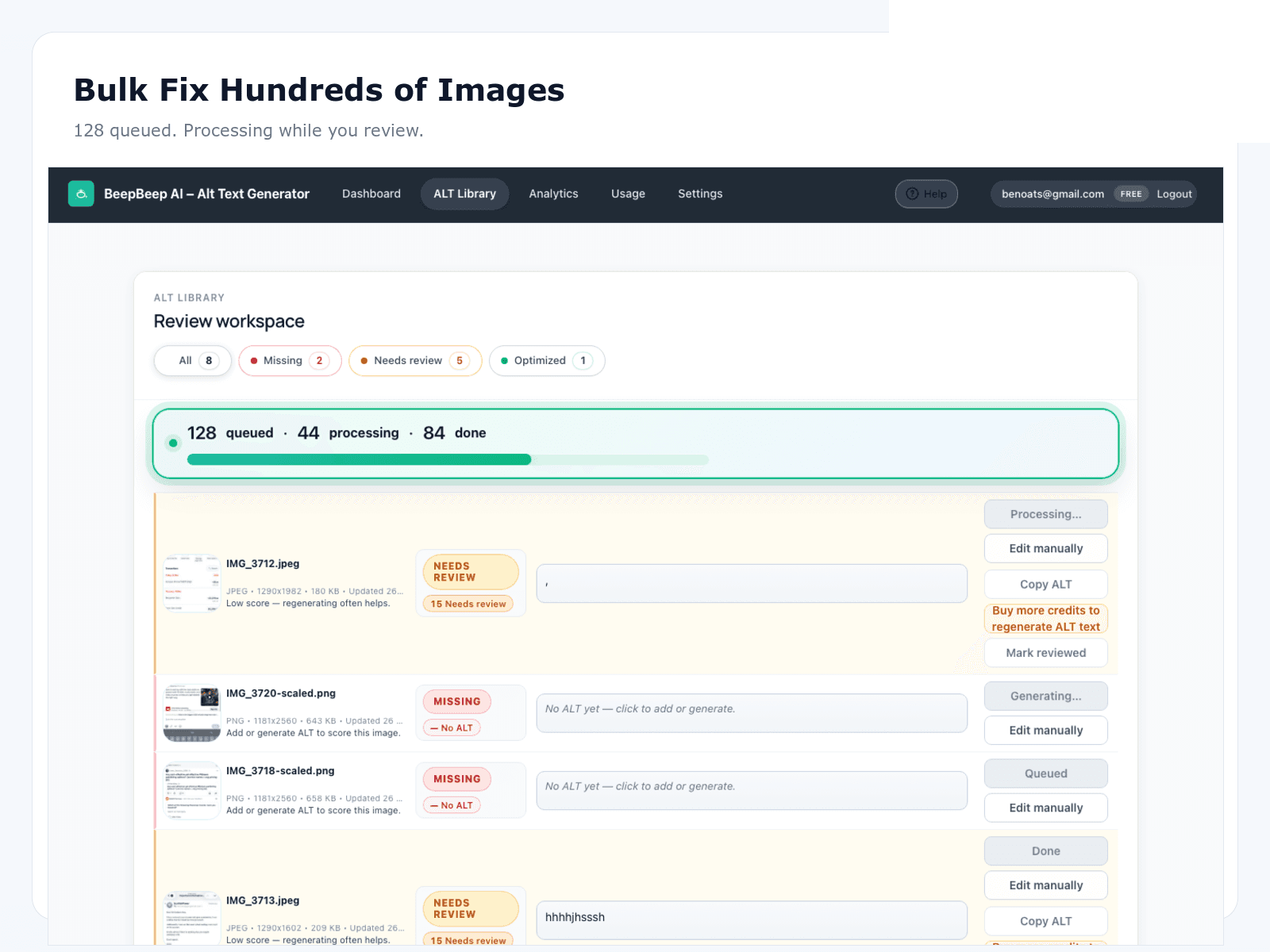
Common fixes during review: wrong colour or material, missing brand name where it matters, over-long copy that should be two clauses, and alt text that describes the photographer’s backdrop instead of the subject. Reject and regenerate, or hand-edit — but do not save drafts you would not want read aloud to a visitor using a screen reader.
For a deeper comparison of when to hand-write versus AI-draft, see manual alt text vs AI. The bulk workflow assumes a hybrid: AI clears the long tail; humans own heroes and edge cases.
- Audit public pages to size the gap. Run the free image SEO audit on a handful of live URLs before opening wp-admin. Confirm missing alt is a real backlog, not a perceived one.
- Install OpptiAI Alt Text from WordPress.org. Install OpptiAI Alt Text Generator (listed as OpptiAI Alt Text). The plugin works on any WordPress media library — blogs, portfolios, membership sites, and stores alike.
- Scan the media library for missing and weak alt. Queue attachments with empty alt, filename-only alt, or generic placeholders. Filter by upload date or folder if your library is large.
- Generate drafts in reviewable batches. Never auto-overwrite existing alt. Generate AI suggestions in batches small enough to read — a few hundred at a time keeps quality honest.
- Approve, save, and maintain on new uploads. Edit brand voice, reject bad drafts, save approved alt text, then keep new uploads on the same loop so coverage does not slip backward.
Maintain coverage so the backlog does not reopen
Bulk remediation is a project; maintenance is a habit. After the first pass, treat new uploads the same way: scan weekly or enable whatever new-upload prompt your plugin provides, generate drafts for missing alt, and approve before publish. Sites that only fix alt once per year rediscover the same gap after the next theme swap or CSV import.
Lock alt into operational checklists: content editor onboarding, agency handoff docs, and migration runbooks. If you import posts from another CMS, map alt columns explicitly. If a designer drops fifty images into a shared folder, someone owns the approval queue before those images appear on live pages.
Re-scan after major events: site redesign, bulk media import, multilingual plugin rollout, or membership tier changes that add new image types. Coverage metrics — percent of in-scope informative images with useful alt — are a honest leading indicator. Google Images clicks are a lagging one. Neither guarantees traffic; both help you narrate progress.
Assign an owner. “Everyone” maintaining alt text means nobody does. Whether that owner is an editor, a part-time VA, or an agency retainer line item, the queue needs a name and a weekly thirty-minute slot. Maintenance is boring; it is also what separates a one-off project from a durable accessibility baseline.
FAQ
Can WordPress do bulk alt text natively?
No. The Media Library is per-attachment. You can edit one image at a time, but native WordPress has no scan queue, no coverage report, and no batch generation with an approval step.
Does this workflow work for WooCommerce too?
Yes — product and gallery images live in the same media library. For store-specific prioritisation and SKU strategy, see the WooCommerce image SEO guide. This page covers the general WordPress workflow.
Will bulk AI hurt SEO if quality is low?
Yes — if you publish unreviewed drafts. The fix is review-before-save, a short style guide (no keyword stuffing, no filenames as alt), and rejecting anything that misdescribes the image.
How much does bulk generation cost?
OpptiAI starts on a free tier. Larger libraries use paid plans from £4.99/month/month. Check current limits on the pricing page before committing to a remediation sprint.
How often should I re-scan after the first pass?
After the initial backlog, scan monthly or after bulk imports. New uploads, theme swaps, and CSV migrations are the usual ways alt text regresses.