See Your WordPress Title Fixes Show Up Inside Yoast
Fixed a weak title in an audit tool but not sure Yoast picked it up? Here's exactly where to check, and what it means if the two disagree.
You just approved a fixed title inside a title audit tool. Yoast is still open in the next tab over. Did the change actually reach the page, or did you just edit a value that nobody — Yoast included — ever reads back?
That question is worth asking every time, because it's the difference between a title fix that shows up in Google search results tomorrow and one that quietly goes nowhere.
Start from the site-wide snapshot, not a single page
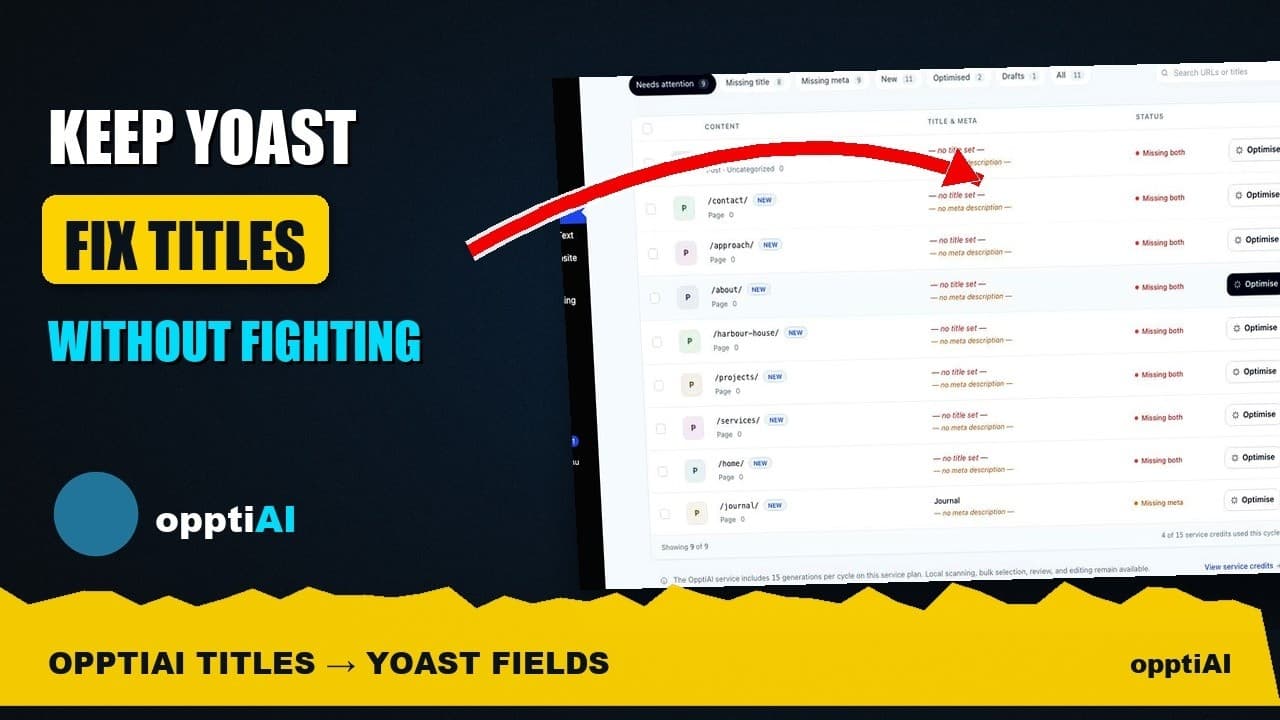
Fixing one title at a time only works if you know which title needs fixing. A site-wide titles and meta health snapshot solves the "which page" problem before you touch anything: it walks every published page and post, flags what's missing, what's duplicated across two URLs, and what's technically present but too short to earn a click, then sorts the list so the worst offenders sit at the top.
That snapshot is where the actual fixing session starts. Instead of opening twelve random pages and hoping you remember which ones had thin titles, you work straight down a ranked list.
Fixing a title in the library versus fixing it in Yoast
Open one flagged page from the snapshot and you land in the Titles Library entry for that URL: the current title and meta description, a scored assessment of what's weak about them, and an AI-drafted replacement sized correctly for a search snippet. You read the draft, edit it if the wording needs a personal touch, and approve it.
That approval step is the one that matters. Approving inside the library isn't a separate, parallel record of what the title "should" be — it writes the new value into the exact custom field Yoast itself stores its title and meta description in. There's no second field competing for control of what shows up in the <head> of the page.
Confirming the title fix reached Yoast's field
This is the part worth actually checking yourself the first few times, until you trust it: after approving a fix in the library, open that same page's editor and look at the Yoast meta box.
- Open the page in the block editor the way you normally would to edit content.
- Scroll to the Yoast SEO meta box below the content area (or open the Yoast sidebar panel).
- Check the SEO title field — it should already show the exact text you approved, not the old weak title.
- Check the meta description field the same way.
- Look at Yoast's own snippet preview, the little Google-style result mock-up Yoast renders. If it matches your approved title and description, Yoast is reading the same value you just wrote.
- View source on the live page (or use a SERP snippet checker) to confirm the
<title>tag and meta description tag in the actual page head match too — this is the version Google sees, so it's the one that counts.
If all three — the Yoast field, Yoast's preview, and the live page source — agree, the fix genuinely landed. If any one of them still shows the old title, something is writing to a separate field somewhere, and that's worth investigating before you run a larger batch.
Why this doesn't turn into two SEO plugins fighting
Yoast, Rank Math, and AIOSEO each already do the job of storing a page's title and meta description and rendering them into the page head — that's not something a title audit tool needs to duplicate. A tool built to work alongside whichever one you run reads the current value out of that plugin's own field, scores it, and writes the approved replacement back into the same field. Nothing new gets registered, nothing competes for which value wins. Your SEO plugin keeps doing the readability checks, the schema markup, and the sitemap it always did; the audit tool's job stops at "which titles are weak, sitewide, and what should replace them."
Making this part of a regular cadence, not a one-off
A single fixing session clears whatever's flagged today. New pages get published, product descriptions get rewritten, and titles that were fine six months ago drift into duplicate or truncated territory as a site grows. Re-running the site-wide snapshot on a schedule — weekly or monthly, depending on how often the site publishes — catches that drift before it accumulates into the hundred-page backlog that makes a full audit feel like a weekend project instead of a five-minute check.
Frequently asked questions
Why would a title fix not show up in Yoast after I approve it?
The most common reason is a caching layer between the database and what you're viewing — a full-page cache plugin or a CDN can serve an old version of the page or even the wp-admin editor screen for a few minutes after a change. Clear the relevant cache and reload before assuming the fix failed. If it still doesn't match after that, check whether the site is running more than one SEO plugin active at once (rather than one disabled), since two active plugins can genuinely register competing fields.
Does approving a title in an audit tool overwrite anything I'd already customised in Yoast?
It overwrites whatever was in the field at the time you approved the change — that's the point, since you're specifically fixing a title you flagged as weak or missing. If you'd already hand-written a strong title in Yoast for that page, the snapshot should have scored it well enough that it never appeared near the top of the list to fix in the first place. Always read the current value shown in the draft screen before approving; it's showing you exactly what's there now.
Can I check this on a staging site before running it on production?
Yes, and it's worth doing for the first batch on any new site so you can confirm the field-matching behaviour described above before trusting it at scale. Run the snapshot, fix a handful of titles, and go through the verification steps above on staging. Once you've confirmed the Yoast field, the snippet preview, and the live page source all agree, running the same workflow on production is the same process, just with real traffic watching.
Checking that a fix actually reached Yoast's field takes under a minute once you know where to look. OpptiAI Titles writes approved titles and meta descriptions directly into the field your existing SEO plugin already renders — so that check should pass every time, not just the first time.
Related Posts
How to Write Meta Descriptions That Improve CTR
A meta description under the limit can still fail to earn clicks. What actually moves click-through rate once the length problem is solved.
Auditing Titles and Meta Descriptions Before a Rebrand
A site migration or rebrand touches every title tag and meta description at once. Here's how to audit both before you launch, not after rankings drop.
WordPress Title Autopilot That Won't Fight Yoast
Manual title fixes don't stay fixed once new pages publish. Here's how to set up WordPress title and meta description autopilot without breaking Yoast, Rank Math, or AIOSEO.