Why alt text still fails on “accessible” sites
Teams often fix templates and color contrast first—visible, ticketable work. Alt text sits in a thousand content objects with no single owner. Editors paste filenames. Marketers stuff keywords. Designers mark everything decorative to dodge the queue. Audits return the same finding year after year.
The fix is process ownership: who decides decorative vs informative, who drafts, who reviews, and how coverage is measured. Tools help only after that ownership exists.
Informative vs decorative (decide first)
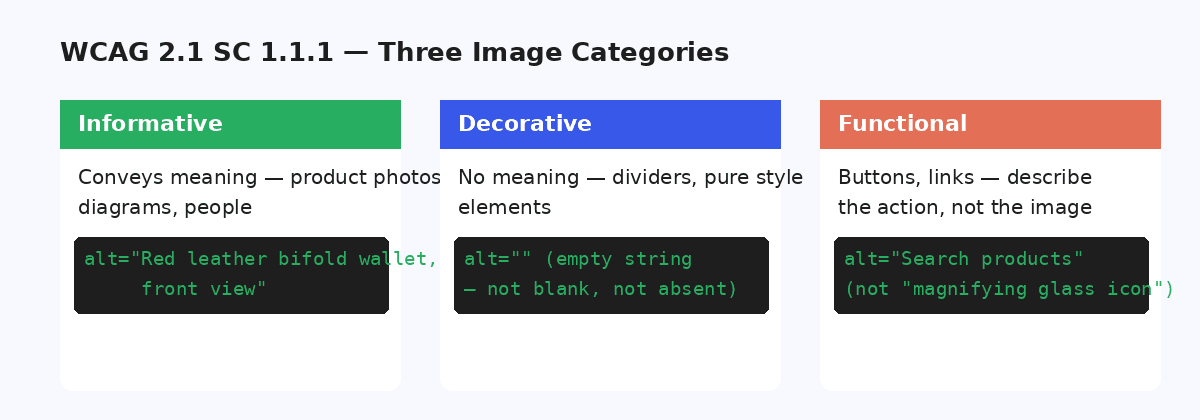
Before writing a single string, classify the image. Informative images convey meaning not present in nearby text—product photos, charts, instructional screenshots, author portraits used for identification. Decorative images are purely visual flourish.
Misclassification is the silent failure mode: empty alt on product images harms shoppers using screen readers; verbose alt on separators wastes time and adds noise. Document examples for your brand so reviewers don’t renegotiate the rule on every ticket.
What WCAG 2.2 expects for images
At a high level, non-text content that conveys information needs a text alternative that serves the same purpose. Complex images may need longer descriptions. Controls that are images need accessible names. Decorative content should be implemented so it can be ignored by assistive technologies.
For criterion-level detail, use the WCAG Alt Text Guide and checklist. This hub stays at the program level so you can brief stakeholders without drowning them in technique IDs.
A remediation process that survives audit
- Baseline coverage of informative images missing alt.
- Prioritise templates and journeys (checkout, key articles, product galleries).
- Draft alternatives; require human review for sensitive or complex images.
- Sample QA with a written rubric—not vibes.
- Re-measure coverage; log exceptions with owners and dates.
- Add a gate for new uploads so the backlog doesn’t refill silently.
Agencies delivering this for clients can mirror the same phases with commercial scoping on the agencies hub.
Where AI helps—and where humans must stay
AI is useful for first drafts of straightforward photos at scale. Humans must stay on charts, medical or legal imagery, brand-critical campaigns, and anything where a wrong description creates risk. Review-before-save is the accessibility-compatible pattern: speed without silent publish.
Use the alt text grader to pressure-test samples during QA training.
Proving progress without overclaiming
Report coverage %, sampled quality outcomes, and residual risk—not “we’re WCAG AA now.” Pair numbers with method (what was in scope, what was excluded). That honesty survives both external audits and internal leadership reviews.
Start with a WordPress alt text audit, then deepen with the WCAG guide when you need criteria language for tickets.
Accessibility resources
FAQ
Does filling every alt attribute mean a site is WCAG conformant?
No. Alt text is necessary but not sufficient. Conformance depends on the full success criteria set, testing method, and scope. Treat image text as one remediation track with measurable coverage—not a certificate.
Should decorative images have empty alt or be omitted?
When an image is purely decorative and adds no information, empty alt (alt="") is the usual pattern so assistive tech can skip it. Document which images count as decorative so reviewers do not renegotiate the rule on every ticket.
Can AI-generated alt text meet accessibility standards?
AI can draft; humans still own accuracy for complex or sensitive images. A review-before-save workflow is the practical middle path for large libraries. Spot-check samples the way you would any other authored content.
What’s the fastest way to find missing alt on WordPress?
Run a coverage audit against the Media Library and templates that output images. Pair OpptiAI’s free audit tools with page-level checks for theme or hard-coded images outside the library.
Where should accessibility leads go next?
Read the WCAG Alt Text Guide and checklist for criteria detail, then use the grader for sample quality review. This hub stays focused on team process and honest scoping.